The AI Prototyping Mastery Ladder
The 15 essential skills for mastering AI prototyping as a product manager
Hey there 👋 This guide is a preview of some of the content from my course, AI Productivity, which is designed to help product managers bring AI fluency to every aspect of their role, whether it’s prototyping, customer & data insights, product strategy, or execution. Next cohort starts April 7th. Learn more.
AI prototyping is fundamentally reshaping the way the best product teams design, validate, and prioritize what to build.
What’s been equally fascinating to watch is just how quickly this approach has gained adoption amongst Silicon Valley technology firms. We are now at the point where Meta, for example, expects PM candidates to use popular AI prototyping tools like Figma Make, Lovable, or Claude Code to prototype a feature live during their interview process.
When I talk to product managers though, it’s become clear that while many of them may have played around with these AI prototyping tools and potentially built a few prototypes, rarely have they really developed a strong mastery of AI prototyping. Their prototypes often generically solve the customer problem, lack branding, lack meaningful differentiation, and often lack depth.
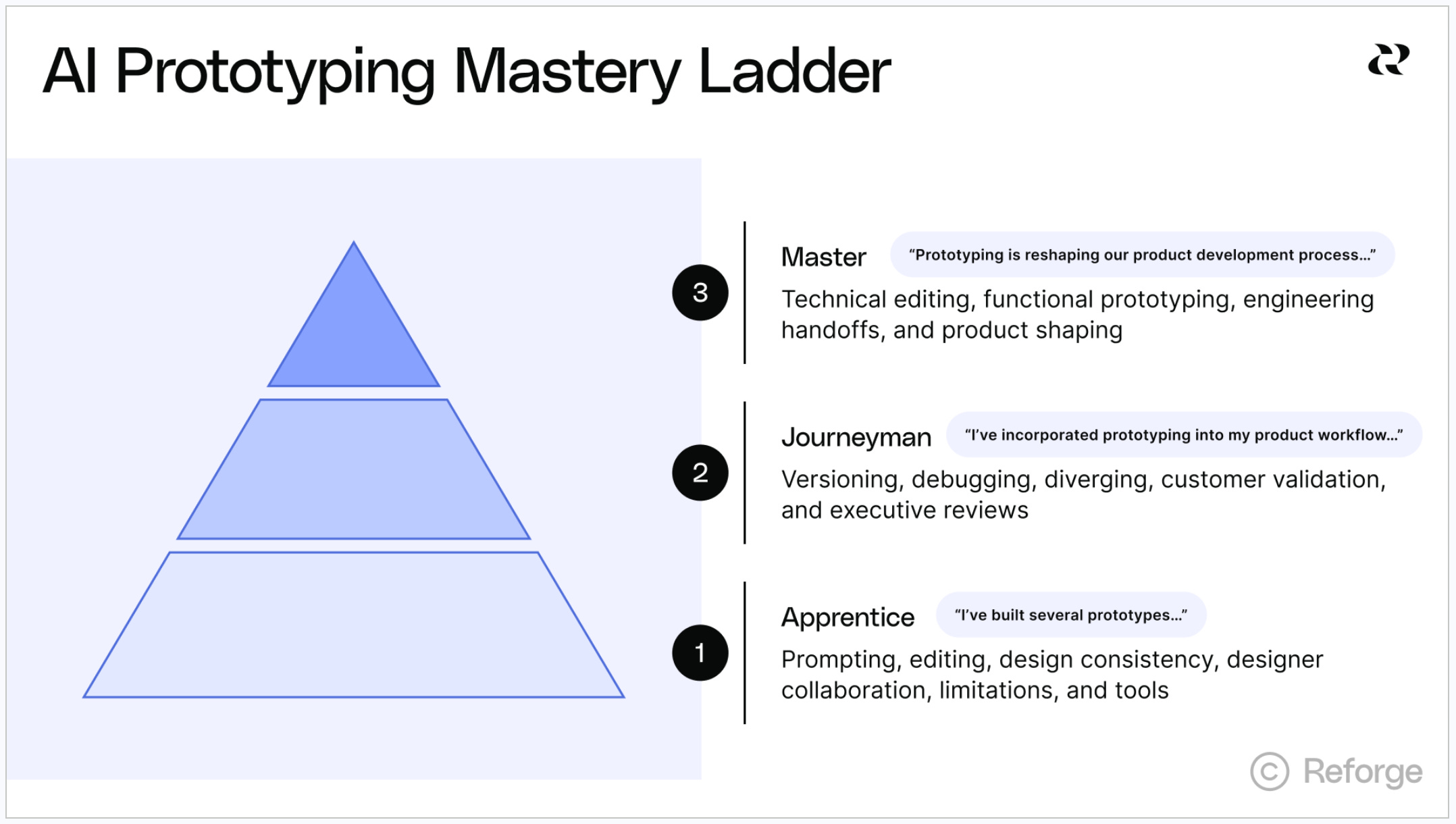
As AI prototyping has become an essential capability of today’s AI native product managers, I realized we needed a far more rigorous approach to teaching PMs how to truly master this new capability. That’s why I developed the AI Prototyping Mastery Ladder, which catalogs the 15 distinct skills PM need to master to prototyping effectively.
In this comprehensive guide I will motivate why AI prototyping matters, introduce the AI Prototyping Mastery Ladder, and guide you through learning each of the requisite skills to take your prototyping to the next level.
The Case for Prototyping
Before diving into the skills, I want to make the case for why every product team should be prototyping. There are two primary arguments I want to make, the first an evolutionary one and the second a revolutionary one.
The Evolutionary Argument
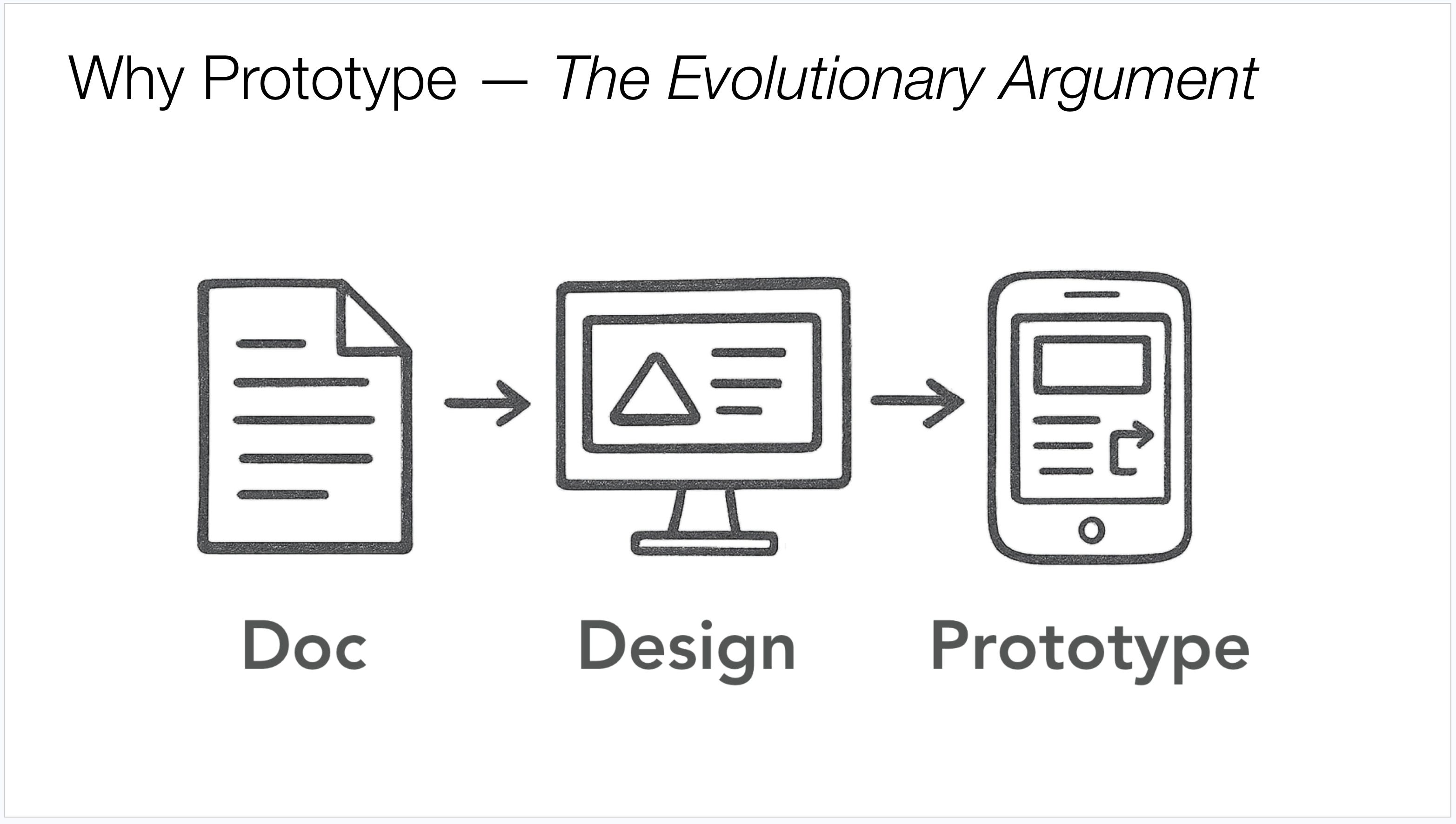
When I started my career at Microsoft as a product manager, I used to write 30-page specs for relatively small features. That was just the name of the game. As an industry, we’ve evolved quite a bit since then. We gained maturity on our design tools, from Photoshop to Figma, and we realized that a picture is worth a thousand words. Today, teams rely heavily on annotated design mockups to communicate what they envision building because those designs are far higher fidelity than you can achieve in words alone.
Prototyping is simply the next evolution of that progression. A prototype goes beyond a mockup by adding interactivity and even functionality, increasing the fidelity even further.
We’re now seeing organizations move fast to adopt this new medium. Jin Su Park, a lead designer at Notion, recently shared that he attended a design crit where no one shared work via Figma. It was all AI prototypes. Design reviews, exec meetings, customer validation sessions are all moving toward vibecoded prototypes as the primary medium of communication.
The Revolutionary Argument
Now this is where I get particularly excited about the potential of prototyping: I believe prototyping has the potential to change how product teams fundamentally prioritize their roadmaps.
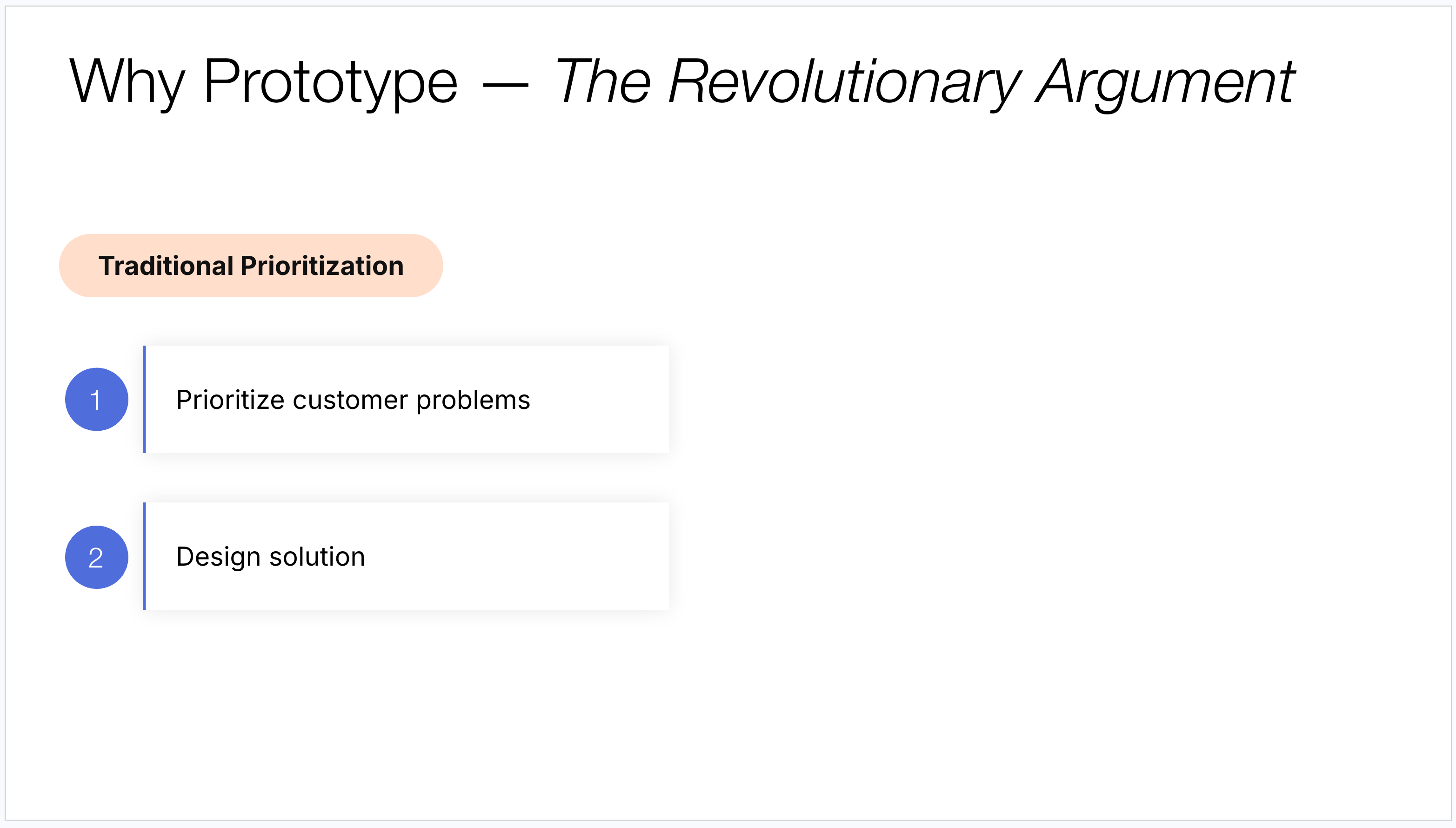
Traditionally, teams start by prioritizing customer problems on the roadmap. Once a problem is prioritized, the team then goes about building a potential solution, going through design reviews and some customer validation.
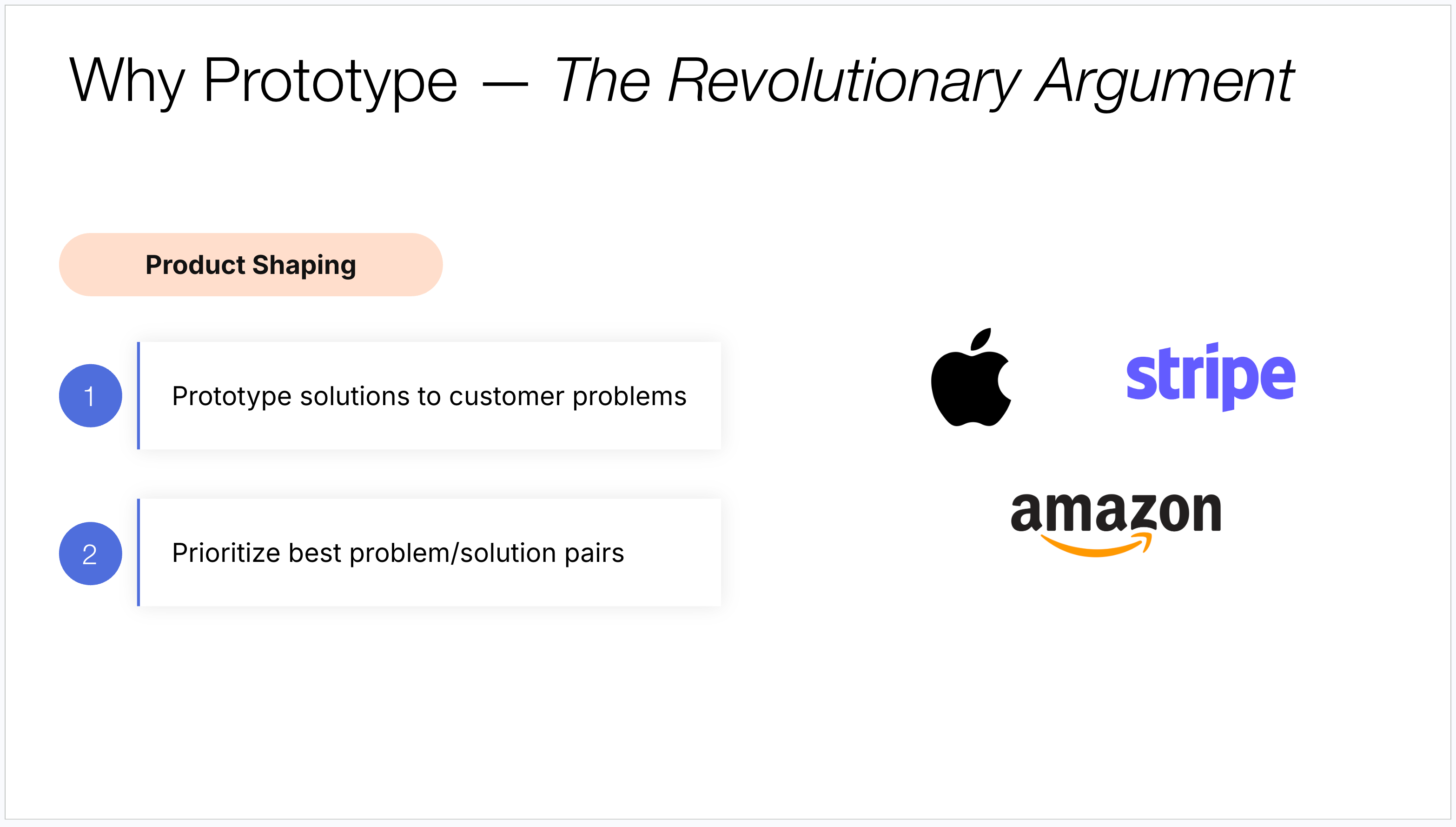
But the best teams don’t actually work this way. They do something I call product shaping. The idea is that instead of prioritizing problems and then building solutions, these teams build a bunch of prototypes for potential problems, test those prototypes with customers, and then prioritize on the roadmap the most successful prototypes. This might sound subtle, but the difference is profound. You’re prioritizing problem-solution pairs that you know have worked because you’ve already prototyped and tested them.
My favorite example of this is Apple. Johnny Ive was in the lab working on a multi-touch interface for a tablet. He shows it to Steve Jobs, who sees the prototype, and rather than pursuing a tablet, they shelved the entire tablet project, went on to create the iPhone, and ultimately change the world. The prioritization decision was driven by the prototype and what it revealed was possible.
Now, why doesn’t everyone do this? It turns out running an expensive prototyping lab where you’re going to throw away 90% of your prototypes is insanely expensive. Most organizations could never justify that. But AI prototyping completely changes that equation. Now we can all be making throwaway prototypes, testing them, and picking the best ones, as fast as we currently wait for our designers to come up with mockups. That’s the revolutionary potential of AI prototyping.
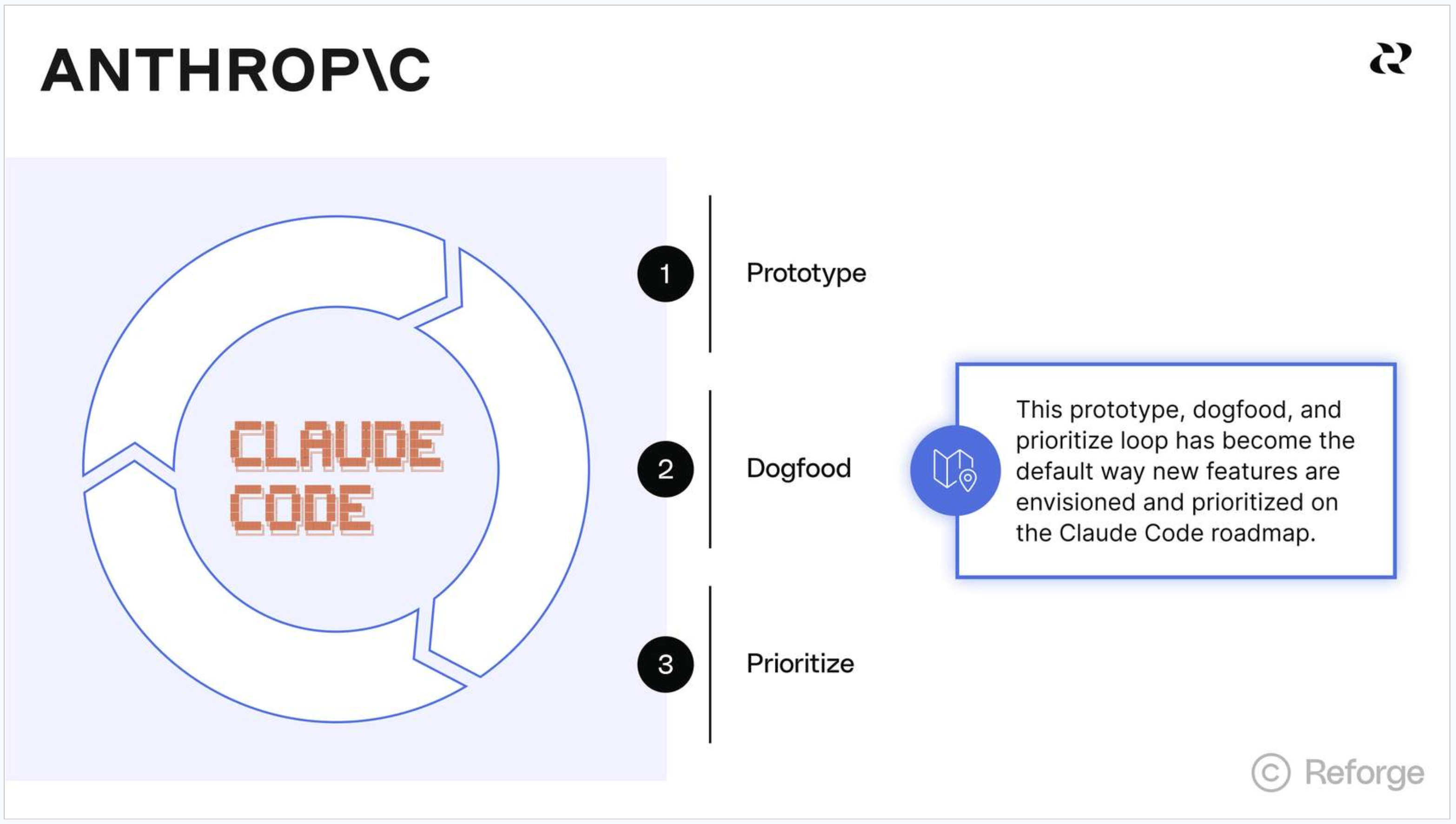
Now, this isn’t some theoretical future state. This is already happening today. Take, for example, the Claude Code team at Anthropic. They are already operating in this exact fashion. The team produces a variety of prototypes of new features for Claude Code and then ships them internally for dog-fooding. If people love the feature internally, they ship it. If the feature gets limited usage or constructive feedback, they go back to the drawing table to improve it or scrap it. With this approach the prototypes effectively drive their roadmap, not the other way around.
The AI Prototyping Mastery Ladder
Hopefully I’ve now convinced you of why your team should be prototyping. The essential question then comes how do you actually become great at it?
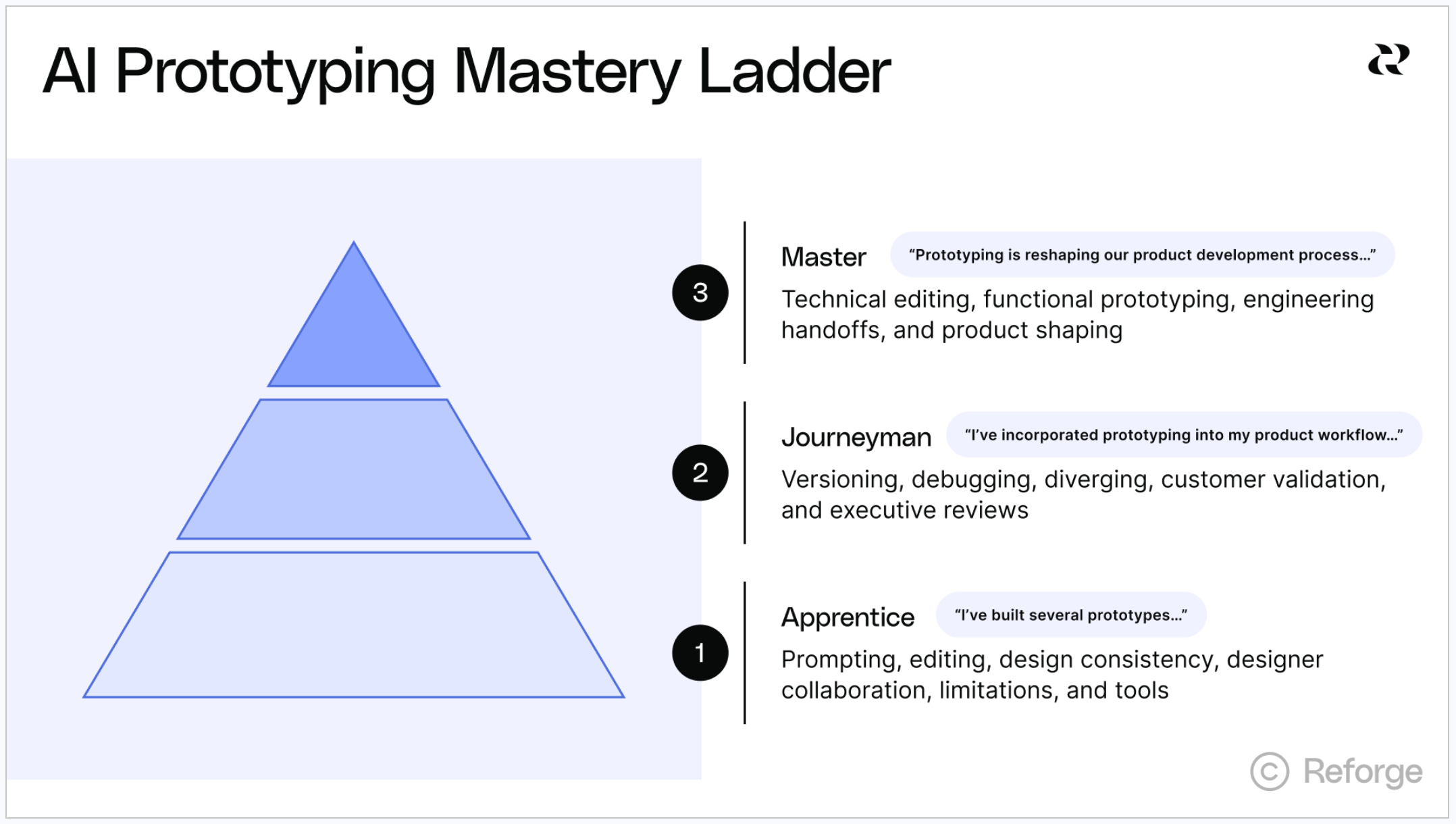
After spending months working with PMs to improve their prototypes, I’ve identified 15 essential skills that you need to master to become a truly effective AI prototyper.
I’ve organized them into a hierarchy of skills because it turns out you have to master the basics before moving on to intermediate and advanced levels, much like the progression of craftsmen from apprentice to journeyman to master.
Let me walk you through each of the three levels:
Apprentice
At the apprentice level, we are really focused on mastering the foundational skills of prototyping, which include the following:
Prompting - The way prototyping tools work is we spend most of our time prompting in English to have them generate code on our behalf. So the first set of skills is around effective prompting.
Editing - We then spend most of our time editing our apps, refining and improving what was generated. There are multiple ways to edit effectively (prompting, prompting w/ selection, visual editing, and code editing), and learning the trade-offs between each is important.
Design consistency - Beyond that, design consistency is critical. The default output of these tools doesn’t look anything like the products we build. We need to learn how to get our prototypes to incorporate our design guidelines and design systems so they look and feel like products from our company.
Designer collaboration - We also shouldn’t be building prototypes in silos, so learning to collaborate with designers is essential.
Limitations - Equally important is learning the real-world limitations of AI prototyping so we understand when not to reach for a prototype for the task at hand.
Tools - Finally, we want a deep understanding of the landscape of prototyping tools and which ones are best suited for our prototyping use case.
Once you’ve mastered these skills, you are well equipped to start building a few prototypes for your team.
Journeyman
At the journeyman level, we are learning advanced prototyping techniques that enable us to deeply incorporate prototyping into our daily product development workflow. The critical skills at this stage include:
Versioning - Versioning refers to keeping track of different iterations of your prototype so you can compare, roll back, or fork your work without losing progress. Knowing how and when to fork, in particular, becomes critical for managing a rich prototyping workflow.
Debugging - As you start prototyping in earnest, you’ll inevitably hit bugs. If you’re non-technical, this can be overwhelming. So learning how to debug as a non-developer is a crucial skill.
Diverging - And then there’s diverging, which is this idea that we shouldn’t just take the first idea in our head and build it. Instead, we should learn how to use AI as a thought partner to come up with multiple design variations, just like we would with a human design partner.
Customer validation - One of the primary use cases for prototypes is validating them with customers. But prototypes offer so much more in terms of validation opportunities than static mockups. So we need to learn how best to leverage these new opportunities to maximize our validation.
Executive reviews - Prototypes are quickly replacing design mockups as the primary presented deliverable in executive reviews, so it’s important to learn how to use them effectively in this setting.
Master
At the master level, we are fundamentally reshaping our product development process due to our new AI prototyping capability. To unlock this, we need to master the following skills:
Technical editing - I’ve found those that are most successful at prototyping get technical enough to gain far more precise control over their prototypes. Technical editing is all about getting technical enough to wield this control.
Functional prototyping - We can make our prototypes go beyond experience prototypes and make them fully functional, where they call real APIs, store data, and support actual user behavior. This skill is all about learning exactly how to do so.
Engineering handoffs - Once we’ve developed our prototype, we need to hand it off to engineering for turning it into a production app. We are starting to see some best practices emerge on how to do this most effectively.
Product shaping - As I mentioned, the real unlock for prototyping isn’t just improving our customer validation process, but fundamentally reshaping our roadmap prioritization process. There are some crucial best practices for making the transition to this new prioritization approach.
Skills In Action
To help you get started on your journey to becoming a master prototyper, I want to go deep on four of these skills that I think are particularly transformative: design consistency, diverging, functional prototyping, and customer validation. (Better yet, watch the video to see each of these demos live).
Design Consistency
One of the biggest challenges with AI prototyping tools is that the default output looks nothing like your actual product. It lacks your branding, your design language, your visual identity. If you can’t make a prototype look and feel like your product, it’s much harder to use it for stakeholder conversations or customer validation.
The simplest way to achieve design consistency is by importing your existing design. You start by bringing your existing product design into the prototyping tool and then prototype on top of that. When you start this way, the AI fully leverages the design baked into the base product when building new features.
There are multiple ways to do this. The most universally supported approach is importing a screenshot of your existing product. Many tools also support Figma imports. And some tools, like Magic Pattern, Reforge Build, and Alloy, even let you import CSS, HTML, and JavaScript directly from your live product via a browser extension.
In my own experience with Notejoy, I started by importing a screenshot into Bolt with a simple prompt: “Please recreate the attached screenshot of Notejoy.” The tool did a decent job on the high level layout: three columns, a sidebar, a note list, and a content area. But the styling wasn’t exactly right. The colors were off, the borders weren’t perfect.
From there, I started making targeted edits. I specified exact hex colors for each area. I removed unwanted borders from list items. I selected specific UI elements and prompted changes like “make fully rounded.” Each of these little changes moved the prototype closer to looking exactly like my product. I spent about an hour making these kinds of edits. It’s helpful to know a bit of CSS terminology here, like “border top” or “border radius,” because you can feed those terms directly to the tool.
The key insight is that you only have to do this once, and in fact only one person on your entire team has to do it. Once you’ve dialed in the design, you can establish what I call a baseline. This baseline prototype incorporates your base functionality and your styles. From that point forward, all future prototypes can be built on top of this baseline, ensuring every new feature prototype inherits the design consistency of your product. Make the baseline shared across your team, and everyone gets leverage from that upfront investment. With these techniques you can easily ensure your prototypes from now on look exactly like your product.
Diverging
One of the most common ways I see people use prototyping tools is to take a single idea and use AI to get it out of their head and into a visual form. That’s fine, but I think it misses the best way to use these AI tools.
When I think about the best experiences I had as a product manager working with my designers, it was the riffing. I’d come up with an idea, they’d come back with three different variations, and then we’d debate the pros and cons of each. We’d ultimately settle on something that was better than the original conception in my head. It turns out AI can be an equally effective design partner if you know how to use it that way.
The approach is to diverge first, coming up with multiple design directions for a feature, and then converge on the particular direction that works best.
Here’s an example from my LinkedIn days. One feature I always thought LinkedIn should build was a “news in your network” feature. Not the global trending news, but news specific to what’s buzzing amongst your connections in your industry.
Using Magic Patterns, I prompted: “I want to add a feature on the LinkedIn homepage called news in your network. It should show the top articles most frequently shared by my network with the people who shared them and their commentary.” Magic Patterns has a feature called inspiration that generates four variations by default. The first came back as a native LinkedIn post format, showing an article with a hero image and commentary from a connection. The second was a hero card layout. The third was a sidebar item inspired by the existing trending news design. The fourth took a tabbed approach with chat-bubble-style comments.
None of these were perfect on their own, but I now had four completely different design directions to debate. Should it be a sidebar item, a top card, or a status update? What are the pros and cons of each? This kind of exploration would have taken far longer if I’d asked a designer to come up with these variations manually.
Certain tools like Magic Patterns and Reforge Build have built-in support for generating multiple variations. But you can achieve this in any tool. In Bolt, I used a similar prompt with the phrase “I want to explore multiple designs for this.” It came back with a detailed layout, a compact layout, a card style, and a timeline view. What’s interesting is that Bolt produced very different design directions than Magic Patterns did, even though both tools use Claude’s foundation models. In practice, I’ll often get variations from multiple tools to increase the surface area of ideas, then start picking and refining the best elements from each.
With this approach I now use AI to create far more design variations than I ever could with my human design partner.
Functional Prototyping
So far I’ve focused on what I’d call experience prototypes, where you’re building the look and feel and basic interactions of a feature. But we can take these prototypes to the next level by making them fully functional. That means they can make real API calls, store data in a database, even support login and registration. All by prompting.
The reason this matters is that we can now test with actual customers using real functionality. In building an Ask AI feature prototype for Notejoy, I took my baseline prototype and prompted it to integrate with OpenAI. I told it I wanted an ask AI sidebar where users could ask questions of their notes. The tool should take the note context and the user’s question, send it to an LLM, and present the answer in the UI.
The result was remarkable. I had a fully working Ask AI feature where I could type a question, it would send the note content and question to the API, and come back with an actual response. I even added a model selector to compare responses from different models. And I didn’t write a single line of code. When I needed to integrate with OpenAI, the tool prompted me for an API key and told me exactly where to put it.
By using these tools to create fully functional prototypes, I can now reach levels of interactivity and functionality my Figma mockups never could.
Customer Validation
Which brings me to validation. Once you have a functional prototype, you can publish it to a public URL and put it directly in front of customers. And there are several powerful ways to instrument it for validation.
The first is built-in surveys. I added a survey that triggers when a user closes the ask AI sidebar, asking how likely they are to use the feature and to describe a personal use case. The survey is instrumented directly into the prototype via prompting.
The second is analytics. I integrated PostHog into my prototype (you could use Amplitude, Google Analytics, or any similar tool) to track daily active users, weekly active users, and retention. I could see whether people who tried the prototype ever came back. That’s hugely valuable evidence before you even build the product. I also instrumented specific events, like tracking when someone clicks the ask AI button or sends a chat message. All of this was added through prompting, not code.
The third is session replays. PostHog also supports session replay, so I could watch actual recordings of users interacting with my prototype, seeing where they clicked, where they hesitated, and where they got confused.
The fourth is heat maps, showing exactly where users click across the entire prototype. This gave me evidence like: everyone presses the ask AI button in the top right corner, but the floating action button in the bottom gets no use.
It’s these kinds of insights that are now made possible with prototype-based customer validation that enable you to refine a feature well before engineering ever gets involved.
Learning All 15 Skills
While we just went through 4 of the skills of the mastery ladder in detail, there are still another 11 that I mentioned I believe are essential.
If you are looking for a structured approach to learning each of the skills, I’d encourage you to check out my AI Productivity course, which teaches each and every one of these skills in detail with video demos of each.
Beyond prototyping, the course goes into all the of the essential skills that PMs need to learn to become AI fluent, spanning prototyping, customer and data insights, strategy, and execution tasks. The next cohort starts on April 7th. Join us if you can.
How to Use Prototypes
Once you have built a prototype, there are three key audiences to use it with:
Your Team
The beauty of prototypes is that you, your designers, and your engineers can all play with the experience directly.
As Steve Jobs said, “There’s a tremendous amount of craftsmanship in between a great idea and a great product. As you evolve that great idea, it changes and grows. It never comes out quite like it started because you learn a lot along the way.”
Prototyping surfaces those trade-offs and learnings far earlier than waiting for a production build. And it’s far easier to iterate on a prototype than on a static mockup, because you’re actually experiencing the interactions.
Executive Stakeholders
We’re seeing organizations bring prototypes to exec review meetings, and they’re incredibly effective.
My favorite example is Duolingo. Most people know them for language learning, but they also recently launched a chess learning app. An enterprising product manager and designer at Duolingo believed the company should get into chess, but it was a controversial idea. What does chess have to do with language learning? Rather than writing a spec or a product strategy document, they built a prototype using Cursor. They demonstrated that Duolingo’s core concepts of puzzles and spaced repetition could be equally applied to learning chess. When the exec team saw the prototype, they had the same aha moment: this does look and feels like a Duolingo product and it leverages our secret sauce. I believe they could never have achieved that level of alignment with a spec alone.
Customers
As I covered above, putting functional prototypes directly in front of customers with instrumented analytics, surveys, session replays, and heat maps takes customer validation to an entirely new level, moving from expressed preferences to observed behavior.
To best illustrate why this is so critical, I found the the Yellow Walkman story to be instructive. Sony was considering releasing a sporty yellow Walkman alongside their traditional black one. In focus groups, people said they loved the yellow one, calling it sporty and fun. But when participants were offered a free Walkman on their way out, 100% chose the black one. User behavior beats expressed preferences every time. Prototypes finally get us to user behavior. You put the prototype in front of customers, let them play with it, and see what they actually do. That’s real validation, and it’s far better than showing a mockup and asking “what do you think?”
The AI Prototyping Tools Landscape
The AI prototyping space has exploded with tools, and it can be genuinely confusing to know where to start. At a high level, there are three categories. Designer-oriented tools add AI to Figma-like experiences, letting you create designs via prompts. However, they generally don’t get you to functional prototyping. Engineer-oriented tools like Cursor and Claude Code are incredibly powerful prototyping tools, even more capable than the PM-oriented tools, but they can require a bit more technical background. For the broadest audience, I recommend the middle category: product-manager-oriented tools that give you functional prototyping without requiring you to be too technical.
Among the product manager-oriented tools, five tools stand out as reliable and capable. Bolt is my personal favorite because it’s fast, and when you’re in the loop of prompting and waiting, speed matters. V0 is excellent at front-end UIs. If you’re focused on high-fidelity user experiences, V0 is a strong choice. Replit excels at building robust prototypes with full database and backend control, though it’s a bit slower than the others. Lovable has made its name on being accessible to non-technical users. And Magic Patterns is specifically focused on product managers and designers, with features like its inspiration mode for generating multiple design variations.
Among up-and-coming tools, Reforge Build stands out for incorporating your product team’s context, including your product spec, product strategy, and customer insights, directly into the prototyping process rather than operating in a silo. Figma Make brings prototyping into the tool designers already live in. Alloy focuses on high-fidelity recreation of existing designs. And both Google (Firebase Studio) and Microsoft (GitHub Spark) have entered the space, worth exploring if you’re already in those ecosystems.
I recently went incredibly deep on prototyping tools in my Complete Guide to AI Prototyping Tools, so would encourage you to check that out as well.
Your Turn
I hope this guide provided you with a useful overview of why AI prototyping matters, how to get started, and how to level up your prototyping skill set.
As a next step, I encourage you to look at each of the 15 skills in the mastery ladder and start thinking about which ones represent your biggest growth opportunities. The tools are here, they’re accessible, and they’re only getting better. The question is whether you’ll take the plunge to upskill today.
Whenever you’re ready, here are 3 ways I can help:
AI Productivity: Learn how leading product managers use AI to become faster, smarter, and gain super powers beyond their traditional role.
Mastering Product Management: Accelerate your product career by learning rigorous frameworks for each PM deliverable, from crafting a strategy to prioritizing a roadmap.
Product Innovation Strategy: Building a new product? Learn how to leverage the Deliberate Startup methodology, a modern approach to finding product/market fit.


