Claude Code for Product Managers
The definitive guide to unlocking the full potential of Claude Code for product management
Hey there 👋 It’s Sachin Rekhi, your favorite product management writer. I recently migrated my blog, which you are a subscriber of, to Substack and this is my first post on the new platform. My new focus is helping product managers master their craft in the age of AI.
This first post, Claude Code for Product Managers, is a preview of some of the content from my course, AI Productivity, which is designed to help product managers bring AI fluency to every aspect of their role, whether it’s prototyping, customer & data insights, product strategy, or execution. Next cohort starts April 7th. Learn more.
Over the last few months I’ve become convinced that Claude Code is now the most productive AI platform for product managers.
I know most product managers are already using AI tools on a daily basis, whether it’s ChatGPT, Claude, Gemini, or Microsoft Copilot. These chatbot-style tools where you ask a question and get a response are undeniably useful. But I’ve come to realize that the real unlock for product managers isn’t in simply using AI to answer your questions. But it’s instead in building AI-powered systems and workflows that actually automate the work we do every day. This is exactly where Claude Code shines and why I’ve gone deep down the rabbit hole on getting the most out of Claude Code as a PM.
In this guide, I’ll share why I believe every product manager should be using it, what’s now possible with this agentic platform, how to get started, and a step-by-step guide for building your own AI workflows.
Why Claude Code
Claude Code was originally built as an agentic coding tool, enabling developers to leverage AI to accomplish far more coding tasks autonomously on larger and more complex code bases.
What makes it fundamentally different from chatbot-style AI tools is that it’s designed to be truly agentic, meaning it is optimized for working autonomously, executing multi-step workflows on your behalf rather than simply responding to individual prompts.
It turns out these same capabilities that make it powerful for autonomously manipulating code make it equally powerful for product work: creating documents, product specs, reports, and analyses.
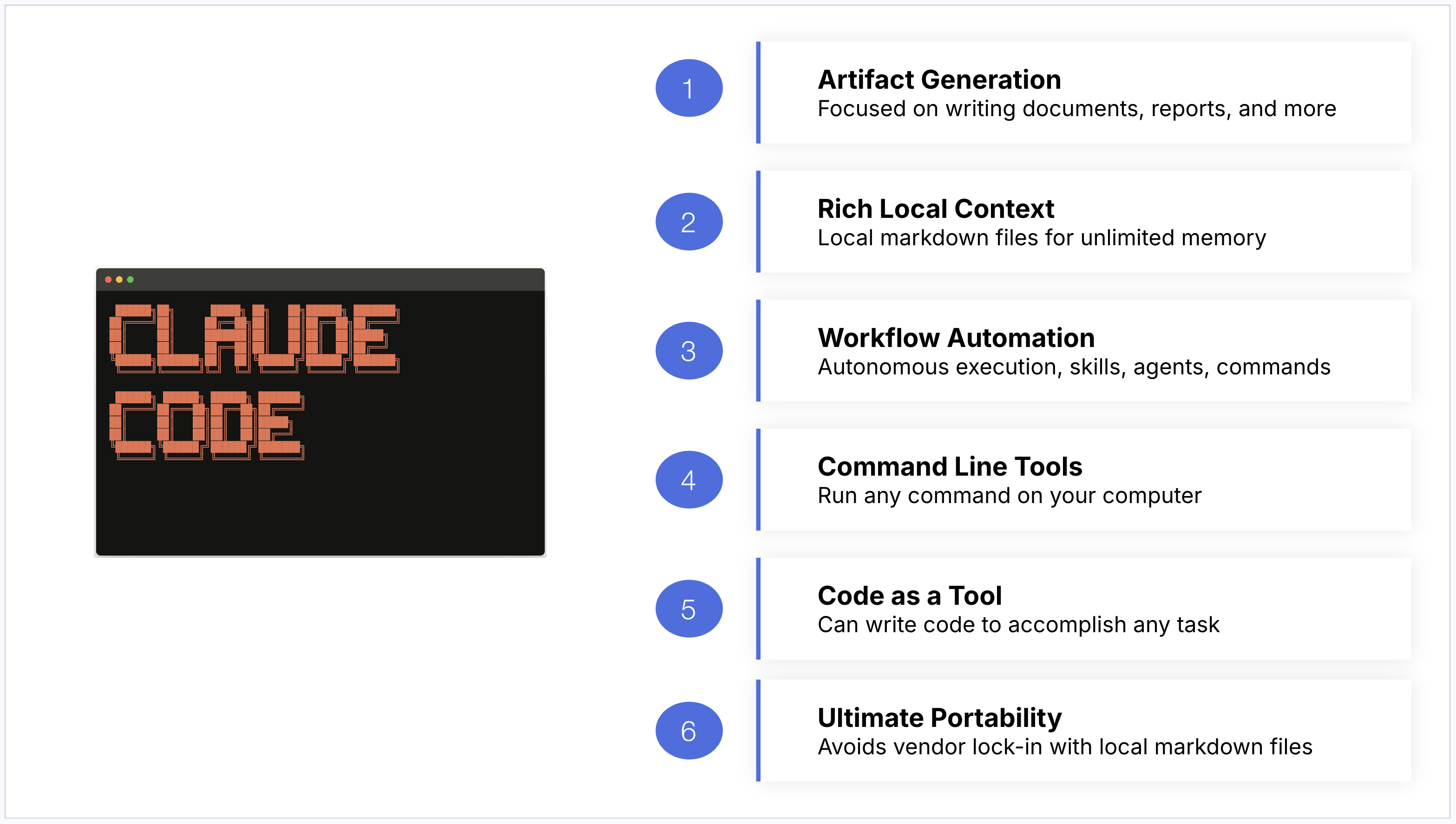
I’ve discovered six unique capabilities that really help set Claude Code apart for product managers:
Artifact generation. Claude Code excels at creating, improving, and modifying artifacts. Whether it’s a product strategy critique, a competitive analysis, or a set of release notes, it’s designed to produce polished output, not just conversational responses.
Rich local context. You can store all of your product data and documentation in local markdown files, and Claude Code can read them quickly and reliably. This is faster than calling third-party APIs or using MCP integrations, which means you can give it a ton of context for your product workflows and it can consume that context efficiently.
Workflow automation. Whether you’re building skills, agents, or commands, Claude Code provides the primitives to automate entire workflows that run autonomously. You can fire off a skill, grab a coffee, and come back to finished work.
Command line tools. Claude Code can run any command on your computer, giving it access to virtually any capability you need, from transcribing audio with Whisper, to querying databases with MySQL, to browsing competitor websites.
Code as a tool. It can even write code on your behalf to accomplish tasks, such as accessing third-party APIs or analyzing data with Python scripts. You don’t even need to know how to code for it to do so.
Ultimate portability. Because everything is stored locally in markdown files, you avoid vendor lock-in entirely. Even the skills you build rely on an open standard. So at any time you can take your data and workflows with you to the next agentic tool that becomes popular. Compare that to something like Notion’s AI capabilities, which are powerful but lock your data into their restricted ecosystem.
Alternative Agentic Platforms
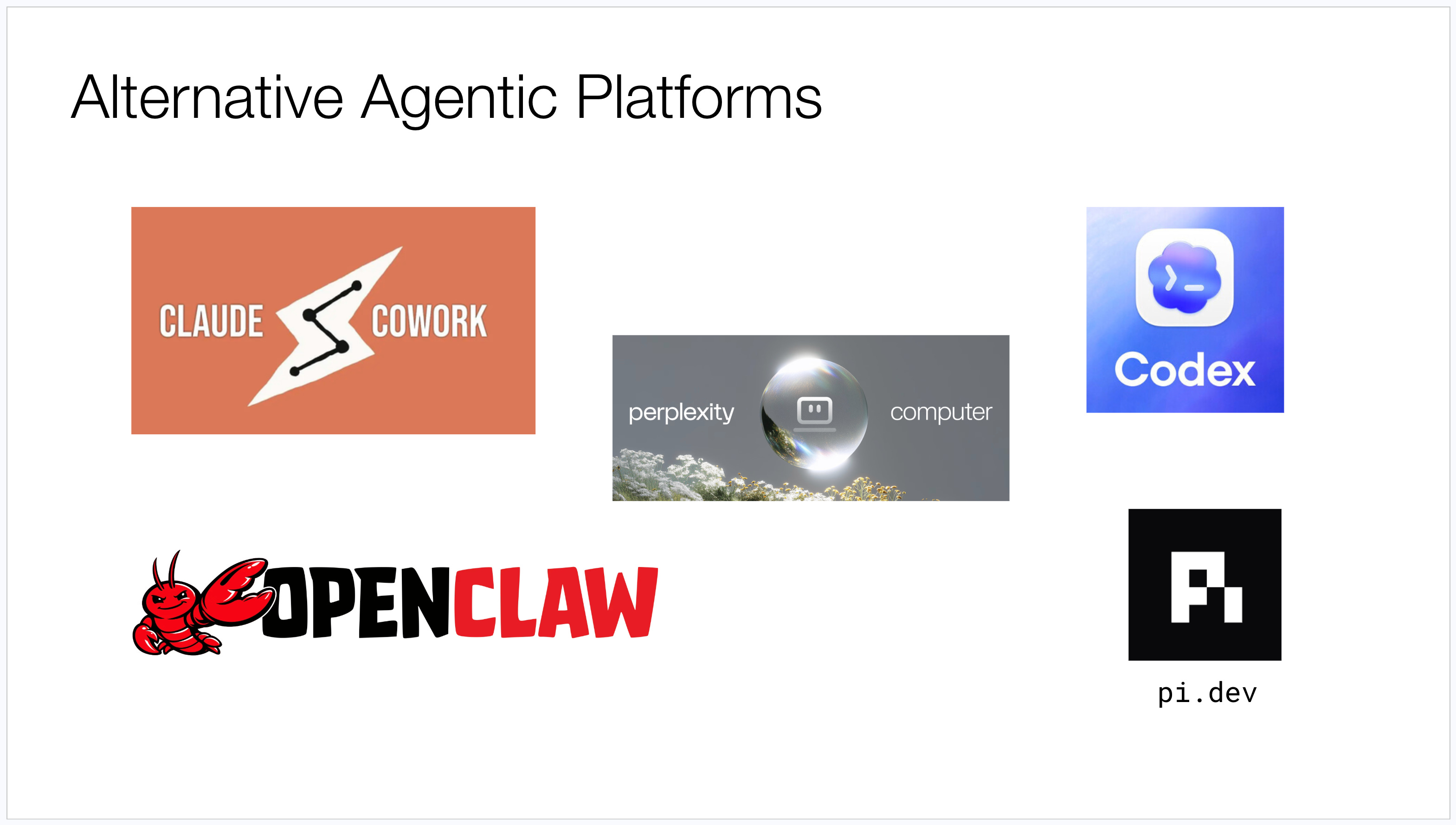
Now, Claude Code isn’t the only agentic platform that has emerged:
Anthropic also offers Claude Cowork, which is more user-friendly, but more limited in scope
OpenAI offers it’s own version with Codex App
OpenClaw is also getting a lot of attention as a highly capable open-source alternative, though it’s also being highly scrutinized for its serious security shortcomings.
Pi.dev is the underlying agent harness used by OpenClaw, which some folks are adopting directly
Perplexity recently launched Computer, it’s own take on an agentic platform
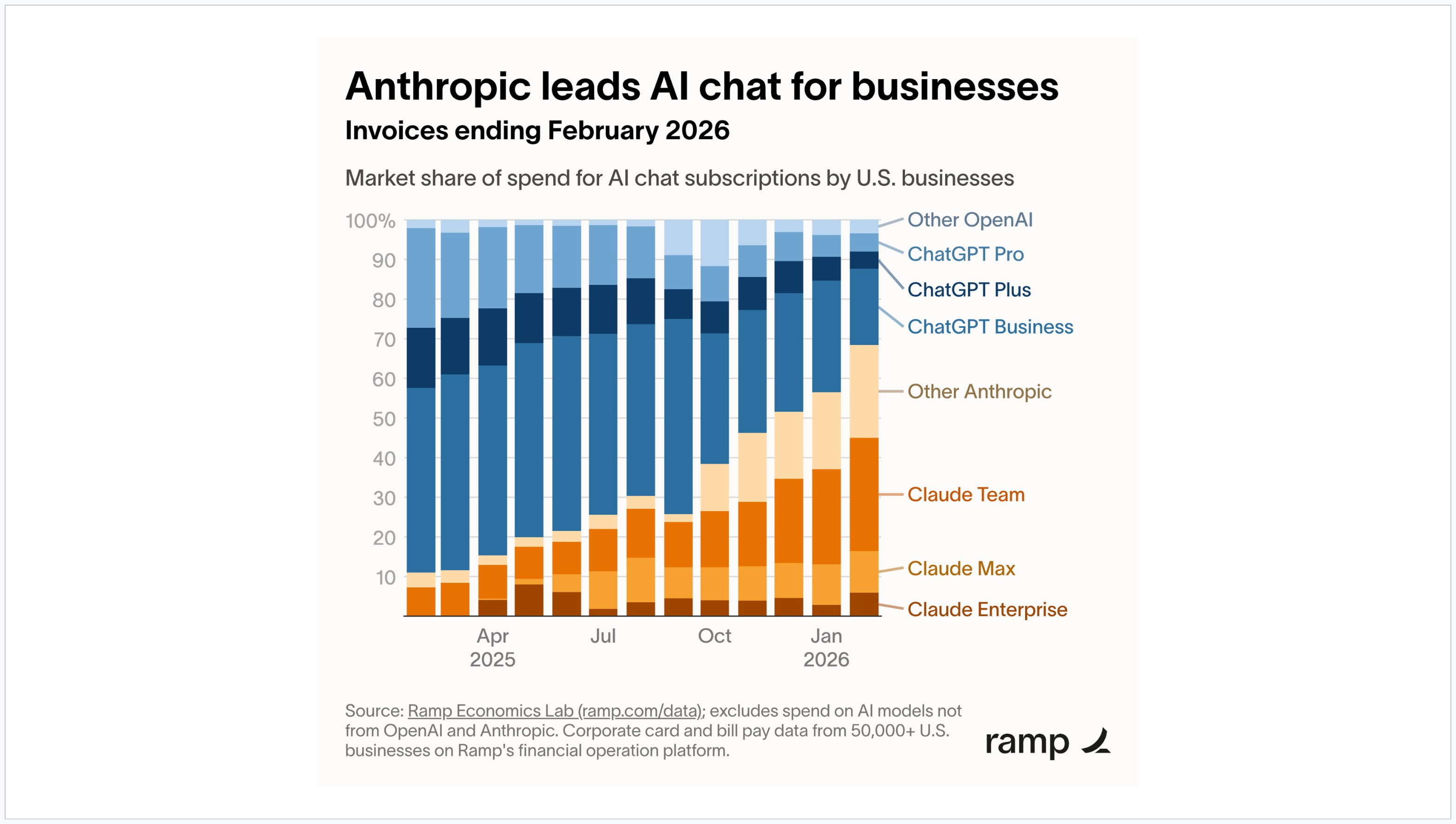
Despite these alternatives, the reason I’m betting on Claude Code is I’ve found it to have the rare combination of both being incredibly powerful and also enjoying broad enterprise adoption today. You can see in the chart that Claude’s enterprise adoption has accelerated as of late making it the enterprise market leader.
It’s clear that learning this tool isn’t just useful now, but you’re also very likely to encounter it in your current or future roles as well.
What’s Now Possible
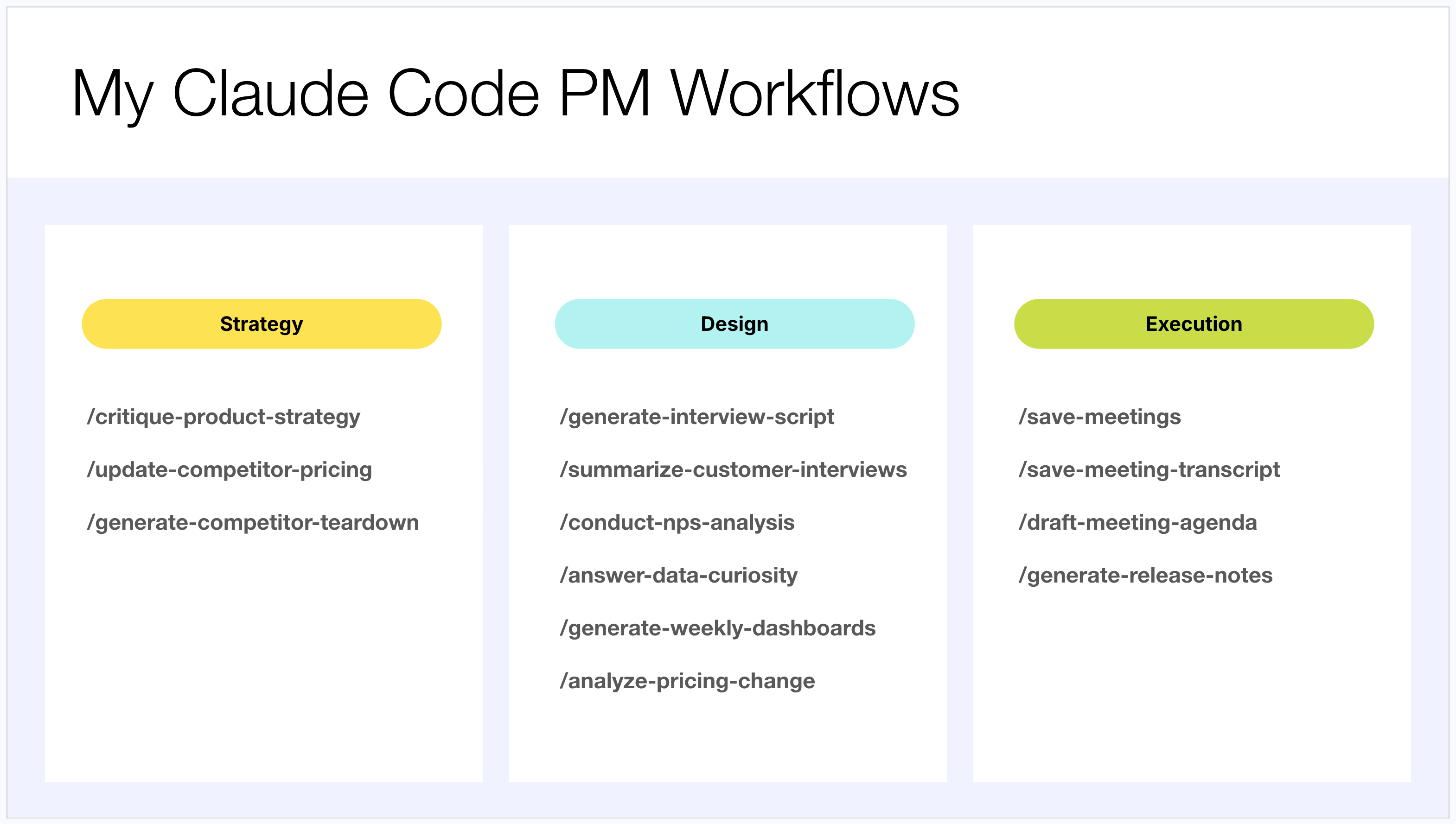
To show you just how powerful this platform is, I want to walk you through the dozen different PM workflows that I now use Claude Code for on a regular basis.
As you may know, I like to think about the product role as dividing into four key responsibilities: vision, strategy, design, and execution. I’ve already been able to build powerful AI workflows across strategy, design, and execution in particular:
For strategy, I use Claude Code to critique my product strategy drafts, update competitor pricing matrixes, and generate competitive teardowns.
For design, I use it to generate interview scripts, summarize customer interviews, conduct NPS analyses, answer data questions, and generate dashboards.
For execution, I use it for managing meetings, drafting meeting agendas, and generating release notes.
Let me walk through five of these workflows to give you a sense of what’s now possible. (Or better yet, watch the video to see each of these demos in action).
1. Critiquing Product Strategy
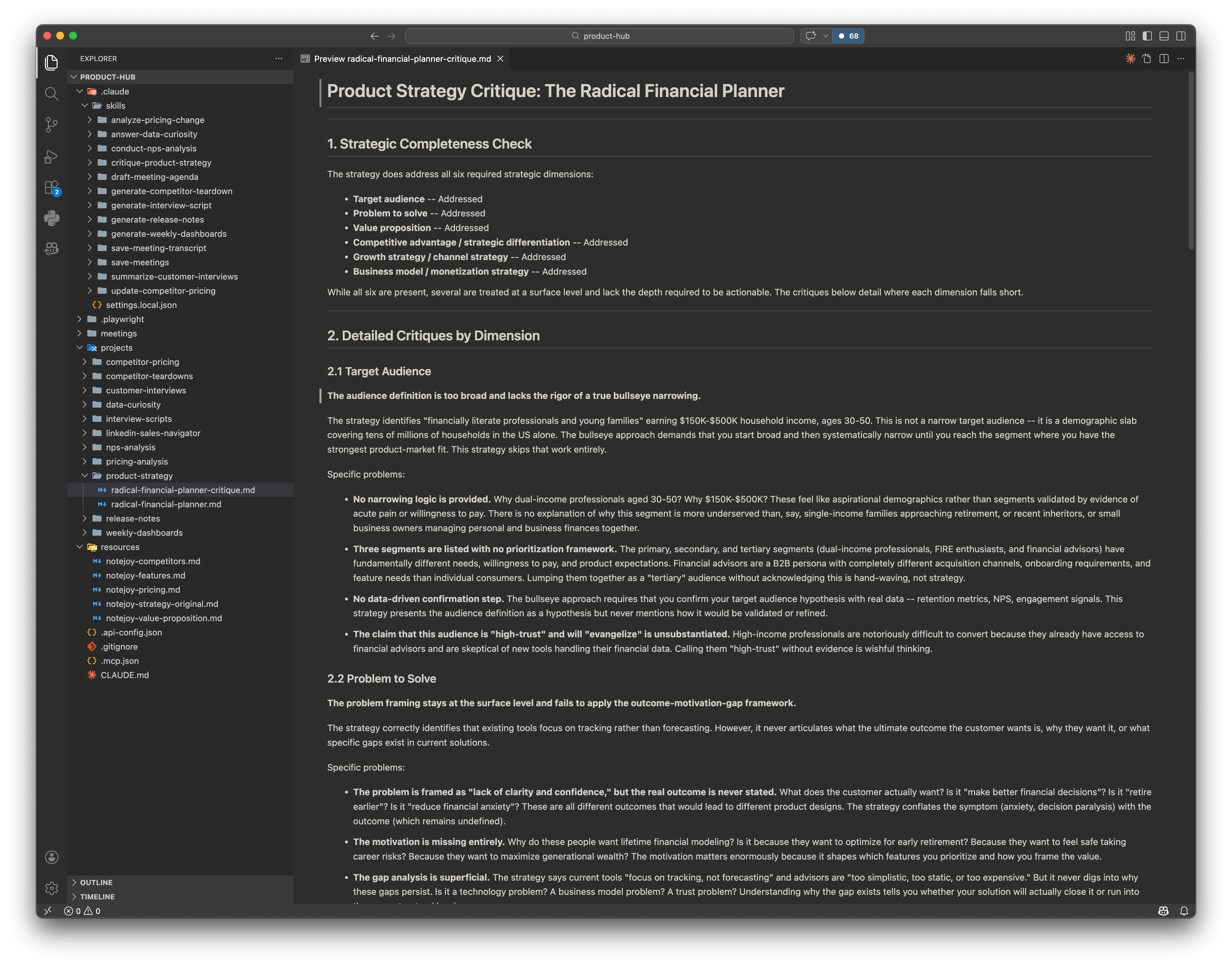
I’ve found that while AI tools aren’t particularly good at generating a product strategy from scratch, they are incredibly good at critiquing one. I built a skill that takes a product strategy document as input and provides a rigorous critique based on a specific set of best practices.
The key to making this work is what I call “showing it what great looks like.” I took all of my course content on product strategy, frameworks for evaluating target audience, value proposition, strategic differentiation, and more, and saved them as local knowledge files. The skill reads the product strategy, then leverages all of those best practices to systematically critique each dimension.
For example, when I ran it against a product strategy I’d been developing for a personal finance product, it told me that my target audience definition was too broad and lacked the rigor of a true “bullseye narrowing.” It flagged that my problem statement was surface-level and failed to apply the outcome-motivation-gap framework. These are critiques grounded in very specific strategic frameworks that I’d fed into the system, not generic AI platitudes.
2. Updating Competitor Pricing
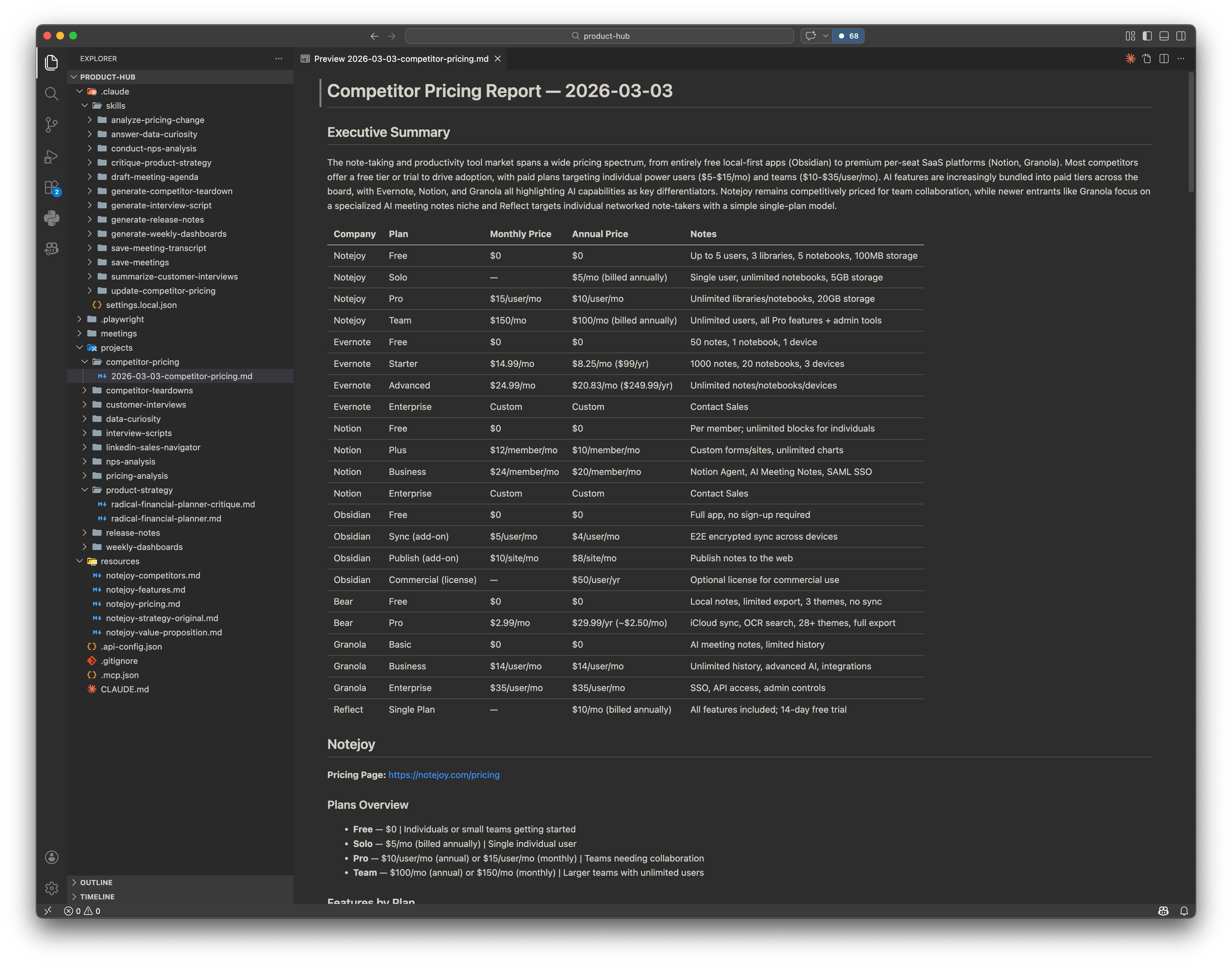
Keeping tabs on competitor pricing is one of those tasks that’s tedious, time-consuming, and easy to let slip. I built a skill that uses Claude Code’s browser agent to automatically visit each competitor’s pricing page, extract the pricing data, and compile it into a comprehensive competitive analysis.
The reason I chose the browser approach is important. In the past, anytime I asked Deep Research or ChatGPT to get competitor pricing, the results were woefully out of date. The tools would inevitably find old pages with stale information. I realized the only way to get accurate pricing data is to have the AI actually navigate to each pricing page in real time and extract the information directly. It’s slower than other approaches, but it’s the most accurate way to get the data.
The output is an executive summary with every competitor’s plan and pricing, which I’ve hand-verified for accuracy. It even provides strategic commentary -- noting, for instance, that my product, Notejoy offers one of the most generous free plans among competitors, or that Evernote’s free tier is the most restrictive.
3. Summarizing Customer Interviews
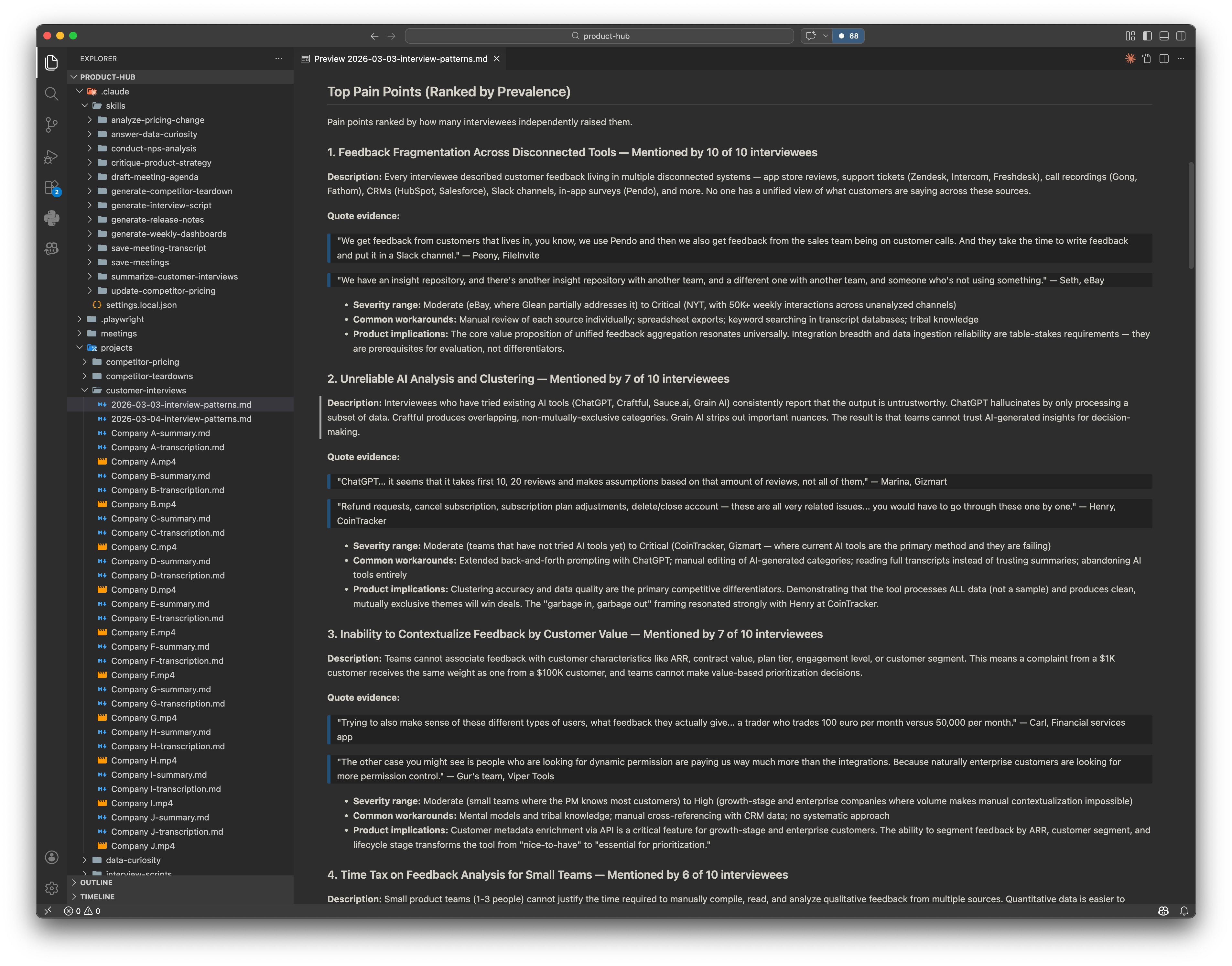
This is one of the workflows I find most valuable. I have a folder of video recordings from customer interviews -- just raw Zoom meeting files. The skill takes each video, transcribes it to text using Whisper (a free transcription tool from OpenAI), and then summarizes each interview using a prescriptive template I’ve designed.
The template is critical. I’m not just telling it to “summarize the interview.” I’ve specified exactly what I want: details about who we interviewed, key takeaways, problems and pain points, their current workflow, alternative tools tried, feature requests, and direct quotes from the customer. This level of specificity in the template is what makes the output genuinely useful rather than a vague summary.
But it doesn’t stop at individual summaries. I then have the skill generate a cross-interview patterns document that synthesizes feedback from all interviews into a single analysis. It identifies pain points by prevalence -- for instance, “feedback fragmentation” appeared in 10 out of 10 interviews -- and includes supporting quotes for each pattern. This kind of synthesis across a large number of interviews is exactly where AI shines. It can do this comprehensively in a way that would take me hours to accomplish manually.
4. Answering Data Questions
I built a skill called “answer data curiosity” that takes any natural language data question, writes the appropriate SQL query, executes it against my database, and then generates a formatted HTML report with tabular results, visualizations, and auditable SQL.
I never have to write SQL anymore. I just fire off a question in plain English and get an answer. What I love most about this is before I relied heavily on my data team, which meant there was significant time before I got answers and I always had to prioritize what were the most important data questions.
Now no data curiosity ever goes unanswered.
5. Generating Release Notes
Writing release notes is one of those tasks I find myself doing repeatedly. I built a skill that takes a GitHub commit URL, inspects the title, description, and changed code files, and produces a user-facing release note with a title and a one-to-five paragraph description written from the user’s perspective.
The power of this became clear when I tested it on a recent commit where my commit message was simply “web clipper added article summaries.” From that minimal input plus the actual code changes, it produced a polished release note explaining that the Notejoy web clipper’s AI summary feature now works with articles and LinkedIn posts, not just YouTube videos, and describing the user experience of the new capability.
Since I gave it the past 20 release notes as examples, it always follows the voice and tone of our previously hand-written release notes, ensuring a quality output.
Getting Started
Now that you have an understanding of what’s possible with Claude Code, let’s get you setup to take advantage of it for your own PM workflows.
Installation
The comment I hear most frequently about Claude Code is that it feels too technical and that it’s really only accessible to engineers. I want to assure you that this is not the case and it’s not nearly as complicated as you might think to get started.
Claude Code works on projects, which is just a folder on your computer. You create a folder (I called mine “product-hub”), right-click on it, go to Services, and click “New Terminal at Folder.” All a terminal is, is a text-based interface to your computer.
From Claude Code’s installation instructions, you copy-paste three commands. You don’t actually have to understand what they’re doing.
And if for some reason it doesn’t work, just go to your favorite chatbot (ChatGPT, Claude, Gemini) and paste in the error message and it’ll tell you exactly how to fix it.
Once installed you just type claude and you’re in.
At that point, you have an input box where you can type anything you want, just like a chatbot. The interface is really that simple.
Tool Decisions
Once you have Claude Code running, there are a few tool choices you’ll want to make:
Terminal. The built-in Mac terminal or Windows PowerShell is good enough to start. I use Ghostty for nicer color coding and themes, but it’s a nice-to-have, not a need-to-have.
Text editor. You need an editor to write skills and view the documents Claude Code produces. Visual Studio Code is free and the most common choice. Obsidian is another option that specializes in viewing and manipulating markdown files.
Voice input. Typing can be slow. I’ve found it’s much faster to dictate what you want Claude Code to do using a voice plugin like Wispr Flow. Claude Code itself is also rolling out its own built-in voice feature, so you may not even need a third-party tool very soon.
Here’s what a few of the most popular tool choices look like:
The key thing is that pretty much everything here is free. The terminals are free, the editors are free. The only thing you need to pay for is Claude Code itself, which is a $20 per month subscription. Honestly, even if my employer weren’t subsidizing it, I’d personally pay for it. It’s made me so productive as a PM that I consider it essential to my workflow.
Building Your Own AI Workflows
Now let’s get into the real work of building your own AI PM workflows.
When to Build an AI Workflow
Before building any workflows, you need to prioritize what workflows are even worth building. To do so, I start by asking myself two high-level questions: is it worth building? and is it possible to build?
Is it worth building? There are two reasons a workflow might be worth automating. First, AI might have a genuine advantage -- it can do the task faster or more comprehensively than you can. When synthesizing customer interview feedback across 10 interviews, AI can do this far more quickly and thoroughly than I could manually. Second, even when AI won’t do it better than you, the task might be time-consuming and frequent enough that offloading it to AI frees you up for higher-level work. In that case, you might just be trying to get it to do the task as well as you, or even slightly worse, and that still ends up being a huge value add.
Is it possible to build? Three factors determine this:
First, can AI acquire the appropriate context? A workflow is really about taking some data, manipulating it, and shaping it into output. But the AI needs access to the right data to do this well, and that’s often more challenging than you’d expect.
Second, does the workflow have discrete steps? Can you break it down to a clear sequence of maybe 10 steps? If there are too many conditionals or too much ambiguity, it’ll be difficult to automate.
Third, is there limited human judgment required? If the workflow requires significant human judgment, it’ll be hard to automate -- though I’d push you to think carefully about this, because AI is surprisingly good these days at tasks we would have previously considered judgment-intensive.
My process now is this: anytime I’m about to begin a task I would have historically done manually, I first ask myself whether it’s worth building an AI automation for it before I even start the manual work. This has saved me enormous amounts of time.
The Five Steps to Building a Workflow
After experimenting with building dozens of these workflows, I’ve ultimately distilled the process into a five-step process that I can now always rely on. Let’s go through each of those steps.
Step 1: Detail the Steps
Break down the task into discrete steps described in plain human language. You don’t need to write any code. For example, here are the steps I wrote for my “answer data curiosity” skill:
Analyze the database, understand the tables and columns, and summarize the schema.
Let the user know you’re ready to answer their data questions.
For each question, construct the appropriate MySQL query and execute it.
Create an HTML report with the original question, the query used, a formatted results table, and a visualization.
That’s it -- human language describing what I want done, and Claude Code is remarkably good at executing it.
Step 2: Decide the Context Strategy
This step is all about determining the strategy for how you are going to acquire the required data for the workflow. This is where I honestly spend most of my time, because every workflow needs particular data from somewhere.
In my experimentation, I’ve identified five reliable ways to get data into a workflow, ranging from fastest and most reliable to slowest and least reliable:
Local files. The fastest and most reliable option. If you can save the data as a local markdown file, Claude Code can reference it directly. I even built a skill that downloads my meetings from Granola and saves them as local markdown files, giving Claude Code direct access to my meeting notes.
Command line tools. Tools like Whisper for audio transcription or GitHub for engineering commit history are tools Claude Code can invoke directly from the terminal.
MCP servers. The MCP protocol connects Claude Code to third-party services like Google Docs, Notion, or Slack. Incredibly helpful, but I’ve found these to be quite token-expensive, so I convert to command line tool equivalents wherever possible.
Third-party APIs. This unlocks limitless possibilities since you can tell Claude Code to write code to access any API on your behalf. You don’t need to know how to code for it to do so.
Browser agent. This allows AI to navigate to a URL, click around in a browser, and extract information. While it’s the slowest and least reliable option, it’s sometimes the only way to get the data you need, as with my competitor pricing skill.
To make this concrete, here’s the context strategies I use for several of my skills:
For summarizing customer interviews, I use local interview recordings combined with the Whisper CLI for transcription.
For generating release notes, I use the GitHub command-line tool to read the commit title, description, and code.
For answering data questions, I use an MCP server to access a read-only MySQL database replica.
And for updating competitor pricing, I use a local competitor list combined with the Chrome browser to visit each pricing page.
Step 3: Determine the Workflow Primitives
Claude Code supports several different approaches for automating workflows, including skills, commands, agents, hooks, and plugins.
I’m going to simplify this for you and give you an opinionated take: right now, skills are the best primitive to start with. Skills are essentially a superset: you can invoke them via slash commands, and you can use them to spawn agents to parallelize work. So at this point, you can use skills as the catch-all workflow primitive for building your workflows.
So for now I’d encourage you to simply learn how to build skills. And only over time learn the nuances of each of the other workflow primitives and when to take advantage of them.
Step 4: Shape the Output
This is where you determine how to influence the output to meet your quality bar. You’ll find as you build workflows, the output initially doesn’t mimic the work you would have done yourself. That’s OK, because I’ve found three key techniques you can leverage to iterate and refine the output:
Templates. Create a detailed template specifying exactly how you want Claude Code to structure the output. My customer interview synthesis uses a template that specifies sections for key takeaways, problems and pain points, current workflow, and direct quotes. This turns it from a generic summary to actionable customer insights.
Best practices. Feed it domain knowledge on what great looks like. For my product strategy critique, I gave it all my course content on what makes a great strategy, and it now leverages that knowledge in every critique.
Inspiration through examples. Give the workflow examples of great output and tell it to produce something similar. I’ll literally give it 10 or 20 examples and Claude Code is remarkably good at following the pattern.
What this all culminates into is a skill folder with a clear anatomy. Each skill contains a SKILL.md file that defines the core workflow steps, an optional /templates folder with the template files that shape the output, an optional /best-practices folder with knowledge documents and examples to leverage, and optionally a /scripts folder with code to facilitate the workflow.
Step 5: Build Incrementally with Claude Code
Here’s the key insight -- you don’t have to build these workflows yourself. Claude Code should do the heavy lifting. When I create a new skill, I describe what I want in natural language, and Claude Code writes the entire skill definition for me. The skill files can look complex, but I didn’t write a single one manually.
For example, to create my release notes skill, my entire prompt was:
Let’s create a skill called generate release notes that takes a GitHub commit URL as an argument, uses the GitHub CLI to download the commit details, inspects the title, description, and changed code files, and produces a user-facing release note.
Claude Code figured out how to parse the URL, researched how to use the GitHub CLI, and wrote out the complete skill. From a simple natural language prompt, it produced a fully structured, working workflow.
And when I wanted to improve the skill’s writing style, I simply told it:
Download the last 20 release notes as examples and update the skill to reference those examples when generating new release notes.
It did all the work to enhance the skill. This incremental approach -- build a basic version with the help of Claude Code, review the output, then refine -- is how I develop every workflow.
How Claude Code Gets Smarter Over Time
One of the most powerful aspects of Claude Code is that your system gets smarter as you use it. Here are the five key ways this happens:
More reference context. Every time Claude Code produces output, that output becomes a local markdown file that serves as additional context for future workflows. I encourage you to always save output as local files -- that’s how the system accumulates intelligence.
Auto-memory. Claude Code supports an auto-memory feature, similar to ChatGPT’s memory capabilities, where it automatically remembers specific preferences or patterns for the future. To add to this directly simply say “remember X”.
Improved templates. As you develop better instincts about what you need from your workflows, you can refine your templates accordingly. One thing I love about this: let’s say I had a question from my user interviews that was previously unanswered. I can update my interview summary template and have it re-run the synthesis across all previous interviews to extract that insight. That’s something we would never do manually because it would be too expensive. But AI makes it trivially easy.
Improved skills. As you use each workflow, you’ll notice opportunities to tighten up the steps, add additional context, or refine the instructions. Each iteration makes the skill more reliable.
Documenting AI misses. Anytime Claude Code makes a mistake or misses something, you can tell it to update its CLAUDE.md or MEMORY.md files so it doesn’t repeat the error. This creates a self-correcting system that learns from its own failures.
Advanced Techniques
Once you have the basics of building workflows down, there are a ton of advanced techniques to dive into, including:
Managing context window - As your session conversation gets long, Claude Code unfortunately gets less reliable. So there are a variety of ways to manage that context window to optimize results.
Git integration - It’s best to store your projects in git so that you can maintain a backup, undo anytime, as well as share your project with your team.
Hooks - These allow you to deterministically cause actions to occur at certain points in the lifecycle.
Plugins - Plugins enable you to share your skills, commands, hooks, and more with your entire team.
—dangerously-skip-permissions - You’ll eventually find all the permission dialogs annoying and this is one of the tools for getting around them.
Scheduled tasks - You can also setup tasks to recur at a certain interval, enabling you to fully automate your workflow so you no longer even need to invoke the skill.
Remote control - You can even control your Claude Code sessions on the go from the web or mobile device.
Auto-generate skills - You can have Claude Code itself generate the skills you are looking to create.
Agent swarms - You can coordinate across multiple agents completing work together.
Web scraping - You can download content directly from across the web to use in your workflows.
I hope this shows you just how limitless the possibilities are with Claude Code.
If you are interested in diving further into Claude Code for product managers, including some of these advanced techniques, I’d encourage you to check out my AI Productivity course, designed to help product managers develop AI fluency across each and every essential PM deliverable, including prototypes, customer & data insights, product strategy, and execution. Our next cohort starts April 7th. You can learn more here.
Limitations
While Claude Code is incredibly powerful, I also want to be honest about where Claude Code falls short.
Today I shared about a dozen skills I now regularly use. But I’ve tried to build about two more dozen skills that I’ve tossed out because the output wasn’t good enough. I see people on social media posting about how they’ve automated their entire PM role with AI, but I can’t imagine they are doing so without generating a lot of slop along the way. Take for example automatically generating PRDs from raw text. I’ve tried this scenario many times and while it does a good job of structuring the output, the substance it generates is usually pretty poor.
After I develop a workflow, I always ask myself is this output good enough to put my name on? The techniques I’ve described -- templates, best practices, and example-based inspiration -- are how I close that quality gap. I’m usually never satisfied with the first version of a skill, but through iterative refinement, I can get the output to a level I’m genuinely proud of. This is where product judgment and taste continue to matter most. Taking the output, deciding if it’s good enough, and iterating on the workflow until it meets your quality bar -- that’s the essential skill of the AI-powered product manager that still can’t be replaced by AI.
Claude Code is also not great at deep research. ChatGPT, Claude, Gemini, and Perplexity all offer better out-of-the-box solutions for deep research tasks. Anytime I need to do exploratory research, I still reach out to those tools and then save the output to a markdown file I can use with Claude Code.
And sometimes using a chatbot remains the simplest solution. When I’m learning something new, doing exploratory work, or don’t need a polished artifact as output, I still reach for chatbots.
Your Turn
I hope this gives you a practical guide to getting started with Claude Code as a product manager. My challenge to you is to go install Claude Code and build your first workflow. The skills you develop here are applicable across the rapidly evolving landscape of agentic AI tools, and the investment you make now will compound as these platforms continue to improve.
Whenever you’re ready, here are 3 ways I can help:
AI Productivity: Learn how leading product managers use AI to become faster, smarter, and gain super powers beyond their traditional role.
Mastering Product Management: Accelerate your product career by learning rigorous frameworks for each PM deliverable, from crafting a strategy to prioritizing a roadmap.
Product Innovation Strategy: Building a new product? Learn how to leverage the Deliberate Startup methodology, a modern approach to finding product/market fit.


Thanks for putting this together. Extremely easy to follow and get started.